How to Complete your Profile
Welcome to the Vector Digital Talent Hub! The steps below will outline how to complete your profile.
Go to the Profile Creation Form. Enter your email address and create a password. You can also utilize your Linkedin profile to sign in.
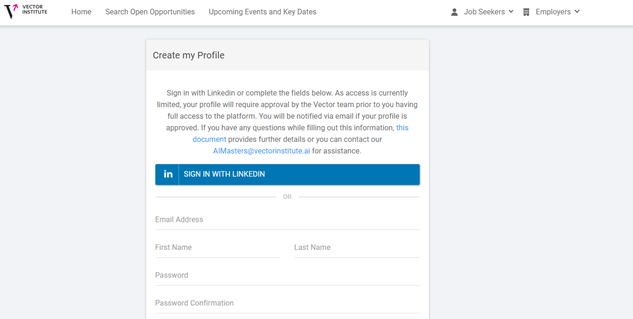
Fill out the details on the form as listed. Below is a short guide to the profile creation form for questions that may have some ambiguity:
How are you associated with the Vector Institute? Please note that you must be associated in order for your profile to be approved.
a. Studying in/Graduated from a Recognized Master's Program: if you are either a graduate or currently enrolled in any of the Masters programs that Vector recognizes, select this option. If you are unsure if your program is recognized, a link to the full list of the recognized programs can be found at this link:
b. Vector Scholarship Recipient: If you have received a scholarship from Vector, select this option. It is recommended to select this option even if you are also Studying in/Graduated from a Recognized Master's Program.
c. Student or Postdoc of a Vector Faculty Member: If you are involved in research alongside a Vector Faculty member, select this option.
d. Post Graduate Affiliate: If you are a member of our Post-Graduate Affiliate program, select this option.
e. Vector Faculty or Faculty Affiliate: If you are a member of the Vector Faculty team or a Faculty Affiliate. Select this option.
f. Other/Unsure: If you are unsure as to your affiliation or you fall into another category, select this option and provide details in the text box below.
Which University have you attended or currently are studying in?
This list includes Ontario universities only, and is intended to capture the most recent educational credential. If you attended or are currently studying in an educational institution outside of Ontario, select other.
What is your level of experience? This could be through internships, PhD research experience or industry experience post graduation.
Your type of experience may differ from these examples, which is perfectly fine. Choose the best fit for your particular situation.
Additional Skills
You can utilize this field to add any keywords from your resume. Technical skills that you are proficient in are useful to add, such as Java, Python, R, C++ and SQL.
Online and Social Presence
Feel free to connect your Linkedin, Twitter, Website or Video to this platform for greater exposure.
Employment, Education, Certifications
These are fields that employers would be able to view if your profile is visible. The more detailed these sections are, the more information employers can utilize when determining if there is a potential fit for their hiring needs.
Acknowledgement of Policies
Please take a moment to familiarize yourself with our relevant policies relating to privacy and terms of use.
Once you click the “Create My Profile” button, you will be redirected to your individual profile. The first thing you will see at the top of the screen are a few buttons relating to your profile, as shown below.

Application History: this is a brief look at positions you have applied for.
- Job Alerts: allows you to automate your search and receive daily or weekly alerts to new jobs.
- Unhide Profile: A default profile is hidden from employers, and they are unable to view your resume or profile details. This button will make your profile visible to employer partners.
- Hide My Contact Information: If you make your profile visible, you can still choose to hide contact information from employers.
View Profile: This allows you to see what employers would see when viewing your profile (if visible).
Note: If your profile is set to hidden, employers will not be able to see your profile in the candidate database. In order to be visible to employers, you must unhide your profile from the default hidden setting.
Feel free to upload your resume and relevant details so that our employer partners can find you, if you would like to utilize this feature. Uploading a resume also makes job applications faster if the employer has opted to utilize resume applications instead of re-directing to their website.
Enjoy the platform and good luck in your search! If you require further assistance or want to let us know your thoughts, feel free to contact us at [email protected].